Lien Waiver Software for Bookkeepers

Turn QuickBooks bill payments into finished lien waivers for your construction clients

Work inside each contractor-owned workspace and generate Progress and Final lien waivers from the bill payments already recorded in QuickBooks Online. Preview the completed PDF, track its status, and upload the finished record back to the payment it belongs to — without rebuilding the document by hand.

app.eazywaiver.net / dashboard
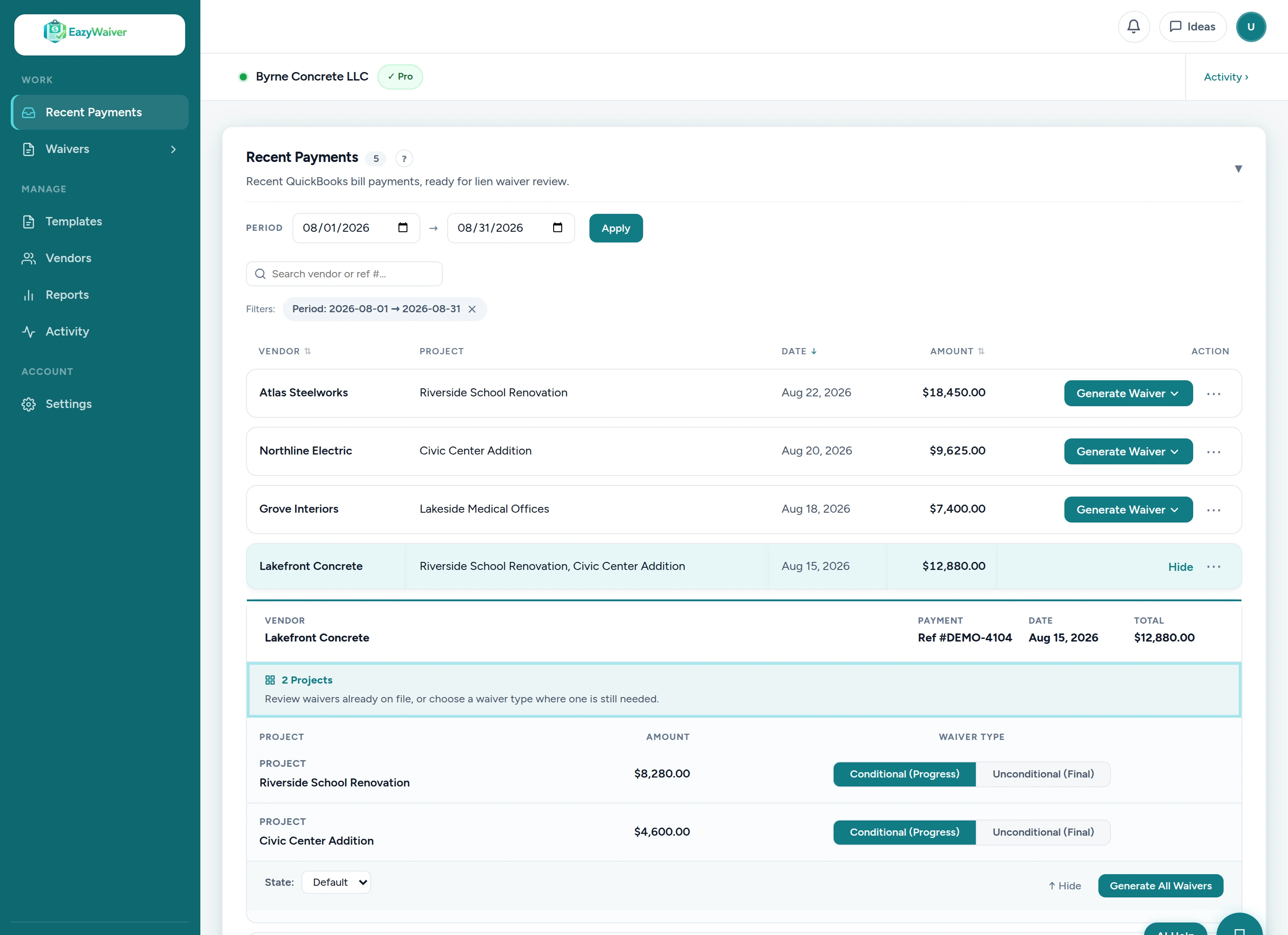
EazyWaiver dashboard listing QuickBooks bill payments with vendor, project, check number, amount, and date, ready for lien waiver generation
How EazyWaiver works with your clients
Built for QuickBooks Online
Contractor-owned workspaces
Company-approved lien waiver templates
Completed PDFs uploaded back to QuickBooks

Your client already entered the payment data. You shouldn't have to enter it again.

Vendor, project, check number, amount, and date are already recorded in QuickBooks Online. Rebuilding each lien waiver by hand repeats that work — and every manual re-entry is another chance for a mismatched amount, date, vendor, or project.

Where time gets lost
  • Payment details are retyped into Word documents that QuickBooks already holds
  • Every manual re-entry risks a mismatched amount, date, vendor, or project
  • Signed documents drift away from the payment they belong to
  • Follow-up emails to vendors get rewritten again and again
  • Closeout gets harder when waiver records are scattered across inboxes and folders
With EazyWaiver
  • Generate the waiver from an eligible QuickBooks bill payment
  • Keep the waiver tied to the correct contractor, vendor, project, and payment
  • Preview the finished PDF before sending
  • Track Draft, Sent, Overdue, Signed, and In QuickBooks status — and use automated reminders on Pro
  • Upload the completed PDF back to QuickBooks

From your client's QuickBooks payment to a signed and filed waiver

The contractor owns the workspace and the QuickBooks connection. You're invited in as a team member — then the waiver work happens where the payment data already lives.

1
The contractor creates and owns its EazyWaiver workspace
Each contractor client has its own separate workspace, with its own billing and records.
2
The contractor connects its QuickBooks Online company
The QuickBooks connection is authorized by the contractor and belongs to their workspace.
3
The contractor invites you as a team member
You work inside the client's workspace — no need to take ownership of their billing or accounting connection.
4
Eligible bill payments appear with payment details attached
Vendor, project, check number, amount, and date come across from the recorded QuickBooks payment.
5
Select the payment and choose Progress or Final
Pick the eligible payment that needs a waiver and the waiver type that fits.
6
EazyWaiver generates the waiver from the client's approved template
The document is filled from the payment data. The contractor's waiver language is never changed.
7
Preview, track, and — on Pro — send for signature
Review the PDF, watch its status, and on the Pro plan send a secure signing link with automated reminders while it's outstanding.
8
Upload the completed PDF back to the related QuickBooks payment
One click files the finished waiver against the payment it came from — and the status shows In QuickBooks.
app.eazywaiver.net
EazyWaiver bill payments list pulled from QuickBooks Online showing vendor, project, amount, and date with a generate waiver action on each payment
Generate

Payment data in, completed waiver out

This is the actual product. Eligible bill payments from your client's QuickBooks Online appear with the details already attached — so the waiver is generated from data, not retyped into a blank document.

  • Vendor, project, check number, amount, and date pulled from the eligible payment
  • Choose Progress or Final for each waiver
  • The document fills from the contractor's configured DOCX template
  • The client's waiver language is never changed
app.eazywaiver.net
EazyWaiver PDF preview showing a completed lien waiver document filled with payment details before download or sending
Preview

Review the finished waiver before anything is sent

Open the completed PDF and check it against the payment before it goes anywhere. What you see is the document generated from your client's own approved template.

  • Preview the completed PDF before downloading or sending
  • Confirm vendor, project, amount, and date against the payment
  • Download the PDF or continue to sending and tracking
app.eazywaiver.net
EazyWaiver waiver tracking table listing waivers by vendor with amount, waiver type, and current status for each record
Track

See what is still waiting on a signature

Every generated waiver appears in one list with a visible status — Draft, Sent, Overdue, Signed, or In QuickBooks — so “did that waiver come back?” is answered by looking, not by searching an inbox. Want the deep dive? See lien waiver tracking software.

  • View Draft, Sent, Overdue, Signed, and In QuickBooks status at a glance
  • Search waivers and filter the list by status, project, or folder
  • A sent waiver that hasn't come back after 14 days is flagged Overdue
  • Completed records stay connected to their originating payment
EazyWaiver status summary cards showing waiver counts for Draft, Sent, Overdue, Signed, In QuickBooks, and total waivers
The live status summary from the EazyWaiver dashboard — waiver counts from Draft through Signed to “In QuickBooks.”
app.eazywaiver.net
EazyWaiver vendor signing panel with Sign Electronically and Upload Signed Copy tabs, draw or type signature options, full name and title fields, and a Sign and Submit button
Sign & Follow Up — Pro plan

Let the system handle the repeat follow-up

On the Pro plan, vendors receive a secure signing link, open it on any device, and sign electronically or upload a signed copy. Automated reminders follow up on unsigned waivers so you don't rewrite the same chase email for every vendor.

  • Vendors don't need an EazyWaiver account to sign
  • Secure signing links and the vendor signing portal are Pro features
  • Automated reminder schedules are configurable per vendor (Pro)
  • Reminders stop when the waiver is no longer outstanding (Pro)

Your client keeps control of its workspace and records

EazyWaiver is built around contractor-owned workspaces. You're invited in as a team member to help manage the lien-waiver workflow — the client keeps ownership of everything that's theirs, and each contractor's workspace stays separate from your other clients.

Each client’s workspace stays separate. Each contractor keeps ownership of its workspace, billing, QuickBooks connection, templates, and records. Your bookkeeping team works inside each client’s workspace by invitation, keeping client data and account ownership clearly separated.

Book a Partner Walkthrough
What your client keeps
  • The workspace and billing. The contractor owns its EazyWaiver workspace and controls its own subscription.
  • The QuickBooks connection. The contractor authorizes and owns the connection to its QuickBooks Online company.
  • The templates. The contractor supplies and approves its own lien waiver templates — EazyWaiver never writes or edits waiver language.
  • The records. Vendors, waivers, and completed documents belong to the contractor's workspace.

Built for bookkeeping teams that support construction companies

If part of your month is turning a client's bill payments into waiver paperwork, EazyWaiver does the document work from the data you already manage.

Construction bookkeepers
Turn client payment data into completed waiver paperwork
Generate Progress and Final waivers from the bill payments you already record, keep each one tied to its payment, and see what's still outstanding.
Lien waiver tracking software
Accounting firms
Support contractor clients without taking ownership of their workspace
Team members join each contractor-owned workspace by invitation. The client keeps its billing, QuickBooks connection, templates, and records.
Construction lien waiver software
QuickBooks ProAdvisors
Add a construction-specific workflow to the QuickBooks services you already provide
EazyWaiver works from the bill payments recorded in a client's QuickBooks Online company — a natural extension of the books you already manage.
QuickBooks lien waiver automation

Help construction clients adopt EazyWaiver while they keep ownership of their workspace

For accounting firms, bookkeepers, and construction advisors introducing EazyWaiver to multiple contractor clients, the Partner Program is a private path to discuss rollout, demo support, and client onboarding.

Bookkeepers and accounting firms

Joining is optional — you can also simply be invited into a contractor's workspace as a team member without joining the Partner Program.

Explore the Partner Program

Simple, transparent pricing

Pricing is per contractor-owned workspace — each client company has its own workspace and subscription. No per-waiver fees. Every plan starts with a 14-day free trial — card required, cancel anytime before you're charged.

Your firm does not need a separate multi-client subscription. Each contractor owns and pays for its own EazyWaiver workspace.

Essential
$149/mo
1 user
For a single company workspace — small contractors or office admins who need to automate waiver generation from QuickBooks.
  • QuickBooks sync and waiver generation
  • Progress and final lien waivers
  • PDF preview and QuickBooks upload
  • Waiver status list with search and filters
Start Essential Trial

No long-term contract. Cancel anytime.

Setup included with every plan

First-template configuration is included — most first templates are configured within 1–2 business days after we receive a usable DOCX file.

Not sure which plan fits a client? Book a Demo

Questions bookkeepers ask before signing up

Straight answers about how EazyWaiver works with contractor clients.

What is lien waiver software for bookkeepers?
Lien waiver software for bookkeepers turns the construction payment data a bookkeeper already manages in QuickBooks Online into finished lien waiver documents. EazyWaiver generates each Progress or Final waiver from the contractor's company-approved template, then helps track, sign, and file it.
Can a bookkeeper use EazyWaiver for multiple contractor clients?
Yes — by being invited into each contractor’s own workspace. Each contractor workspace stays separate, so your bookkeeping team works inside each client’s workspace individually while the contractor keeps ownership of its billing, QuickBooks connection, templates, and records.
Who owns each EazyWaiver workspace?
The contractor. Each workspace, its billing, its QuickBooks connection, its templates, and its waiver records belong to the contractor client. Bookkeepers are invited in as team members to help manage the workflow.
Does each contractor need its own workspace and subscription?
Yes. Pricing is per contractor-owned workspace, so each contractor client has its own workspace and its own subscription. One subscription does not cover multiple contractor clients.
Does EazyWaiver work with QuickBooks Online?
Yes. EazyWaiver connects to the contractor's QuickBooks Online company, reads recorded bill payments, and generates waivers from that data. Completed waiver PDFs can be attached back to the related payment in QuickBooks.
What information is pulled from QuickBooks?
Vendor, project or customer, check number, amount, and payment date from eligible bill payments — the details needed to fill the contractor's configured waiver template without retyping them.
Does EazyWaiver provide lien waiver forms?
No. EazyWaiver never provides or edits legal waiver language. Each contractor uploads its own company-approved lien waiver template, and we configure it so it fills from payment data. EazyWaiver does not provide legal advice and does not determine which waiver form should be used.
Can vendors sign without creating an account?
Yes, on the Pro plan. Vendors receive a secure signing link, open it on any device, review the waiver, and sign electronically or upload a signed copy — no account or software required on their end.
Can EazyWaiver automatically remind vendors about unsigned waivers?
Yes, on the Pro plan. Automated vendor reminders help follow up on unsigned waivers without repeated manual emails. The reminder schedule is configurable per vendor, and reminders stop when the waiver is no longer outstanding.
Are signing and reminders included in Essential?
No. Secure signing links, vendor electronic signing, and automated reminders are Pro plan features. Essential includes QuickBooks sync, waiver generation, PDF preview, QuickBooks upload, and the waiver status list.
How long does template configuration take?
Most first templates are configured within 1–2 business days after we receive a usable DOCX file. First-template configuration is included with every plan.
Is joining the Partner Program required?
No. The Partner Program is optional. A bookkeeper can simply be invited into a contractor's workspace as a team member without joining the Partner Program.

Stop rebuilding lien waivers from data already sitting in QuickBooks

Book a partner walkthrough to see how EazyWaiver fits into the lien-waiver workflow you already manage for construction clients, or see how client setup works first.

First-template setup included
Cancel anytime
QuickBooks-connected