Construction Lien Waiver Software

Keep every lien waiver tied to the payment, vendor, and project it belongs to

EazyWaiver is construction lien waiver software that generates Progress and Final waivers from the bill payments you record in QuickBooks Online, using your company-approved template — then tracks each waiver through signature and stores the completed record with the payment it belongs to.

14-day free trial · Card required · Cancel anytime before you're charged

app.eazywaiver.net / dashboard
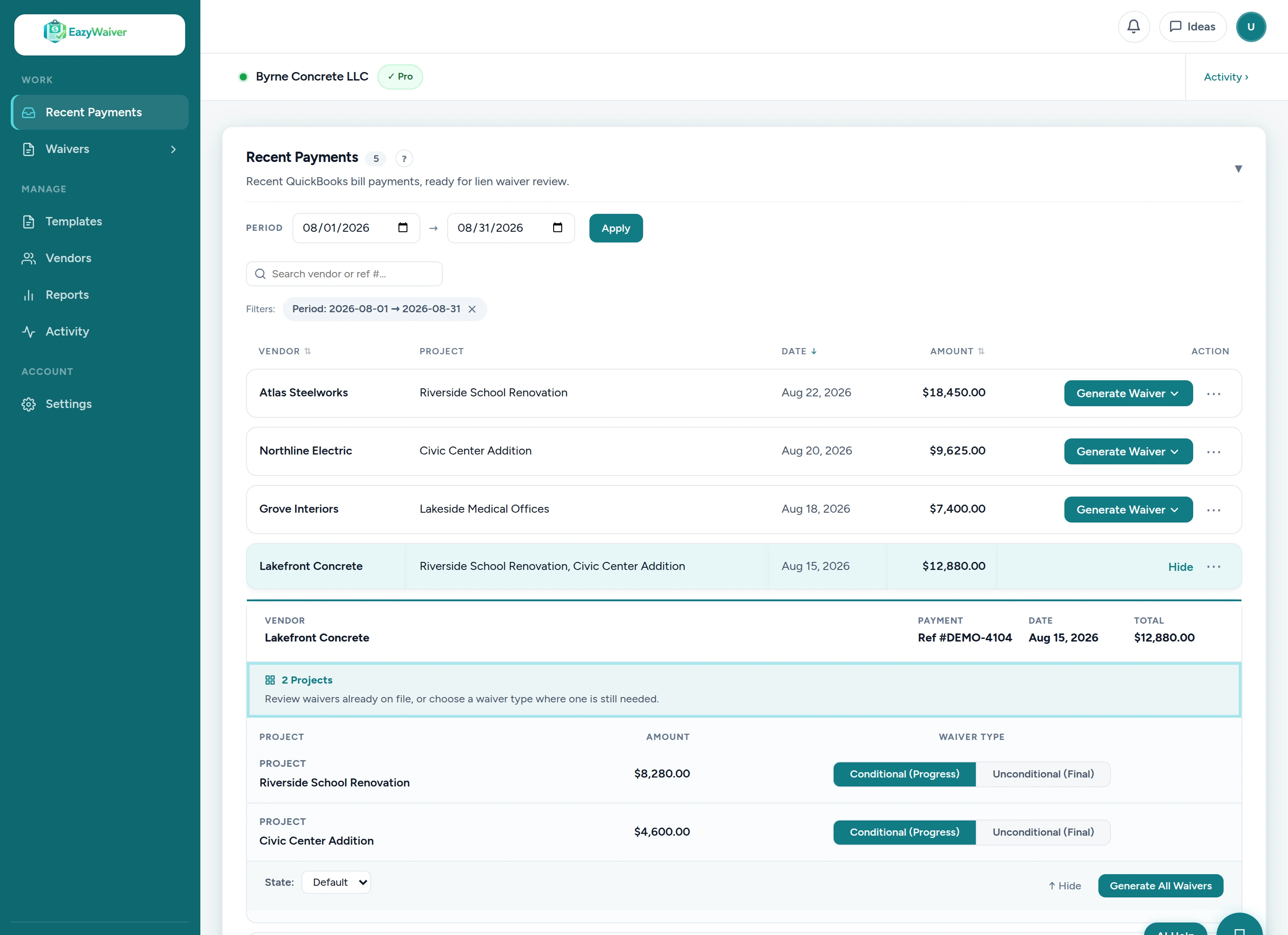
EazyWaiver dashboard listing QuickBooks bill payments with vendor, project, amount, and check number, each ready for lien waiver generation
What EazyWaiver does
Connects with QuickBooks Online
Progress and Final waivers
Your company-approved templates
Every waiver tied to its payment

Waiver paperwork falls apart as jobs and vendors multiply

On an active construction schedule, every vendor payment can mean another waiver to create, send, chase, and file. The paperwork grows faster than anyone's filing system.

Where it breaks down
  • Payment details get re-entered by hand into each waiver document
  • The connection between a waiver and its originating payment gets lost
  • Someone has to manually check which vendors have actually signed
  • Follow-up means writing the same reminder email again and again
  • At closeout, signed records have to be hunted down across inboxes and folders
What organized looks like
  • Each waiver is generated from the bill payment it belongs to — no retyping
  • Vendor, project, check number, amount, and date come straight from the payment record
  • One list shows every waiver's status — draft, sent, overdue, signed, in QuickBooks
  • Automated vendor reminders on Pro help follow up on unsigned waivers without repeated manual emails
  • Completed waivers stay searchable and tied to the payment — ready when closeout comes

From bill payment to signed, filed waiver

The workflow follows the way construction teams already pay vendors — it starts with a bill payment in QuickBooks Online and ends with a completed waiver stored with that payment.

1
Record the bill payment in QuickBooks Online
Pay your subs and suppliers the way you always do. Nothing about your payment process changes.
2
The payment data syncs to EazyWaiver
Vendor, project, check number, amount, and date are read from the bill payment — the details every waiver needs, already recorded once.
3
Select the payment and choose Progress or Final
EazyWaiver generates the waiver from your company-approved template, filled with the payment data. Your waiver language is never changed.
4
Preview and send (Pro)
Review the waiver as a PDF, then send the vendor a secure signing link by email.
5
The vendor signs or uploads a signed copy
On Pro, vendors open the signing link on any device and sign electronically or upload a signed copy — no account needed on their end.
6
Track every waiver's status in one list
See what's still in draft, what's been sent, what's overdue, and what's signed — without checking inboxes or spreadsheets.
7
Upload the completed PDF back to QuickBooks
One click attaches the completed waiver to the related payment in QuickBooks, and it stays stored in EazyWaiver too.
app.eazywaiver.net
EazyWaiver payment dashboard showing QuickBooks bill payments with vendor, project, check number, and amount, each with a Generate waiver action
Generate

Every payment, ready to become its waiver

This is the actual product. Your bill payments appear with vendor, project, and amount already attached — so the waiver you generate is tied to the right payment from the start, not matched up after the fact.

  • Vendor, project, check number, amount, and date pulled from the payment — not typed
  • Progress and Final waivers, generated from your company-approved DOCX template
  • Generate a waiver directly from an eligible bill payment
app.eazywaiver.net
Generated lien waiver PDF preview in EazyWaiver showing an unconditional final waiver filled with fictional demo data from a bill payment
Preview

Check the finished waiver before anything is sent

Every generated waiver can be previewed as a PDF — your own template, filled with the payment data. The PDF you preview is the same document the vendor receives, so errors get caught before they leave the office.

  • PDF preview before anything is sent
  • Your waiver language, exactly as your company approved it
  • Download the PDF anytime
app.eazywaiver.net
EazyWaiver vendor signing portal e-signature panel with Sign Electronically and Upload Signed Copy tabs, draw or type signature options, claimant name and title fields, and a Sign and Submit button
Sign — Pro plan

Vendors sign from a secure link — no chasing paper

On the Pro plan, each waiver gets a secure signing link. The vendor opens it on any device, reviews the waiver, and signs electronically or uploads a signed copy — no account or software required on their end.

  • Mobile-friendly vendor signing portal — vendors need no login (Pro)
  • Built-in electronic signature, or upload of a signed copy (Pro)
  • Signature events recorded in an audit log (Pro)
app.eazywaiver.net
EazyWaiver waiver tracking table showing each waiver's amount, type, and status: draft, sent, signed, or uploaded in QuickBooks
Track & Follow up

Know what's draft, sent, overdue, signed, and filed

One list shows where every waiver stands — Draft, Sent, Overdue, Signed, or In QuickBooks — so closeout never starts with a search through inboxes and job folders.

  • Status tracking from Draft and Sent through Overdue, Signed, and In QuickBooks
  • Automated vendor reminders on Pro help follow up on unsigned waivers without repeated manual emails
  • Completed waivers uploaded back to QuickBooks as attachments on the payment
  • A searchable record of every waiver, tied to the payment it belongs to
EazyWaiver status summary strip showing waiver counts by stage, including signed, In QuickBooks, and total waivers
The live status summary from the EazyWaiver dashboard — from draft through signed to “In QuickBooks.”

The same waiver, two very different workflows

The manual way
  • Open the payment record
  • Retype vendor, project, check number, amount, and date into a document
  • Build and save the waiver, then email it to the vendor
  • Follow up manually until the signed copy comes back
  • Search for the signed copy when someone asks for it
  • File it again for closeout
With EazyWaiver
  • Keep recording payments in QuickBooks like you always do
  • Select the eligible payment and choose Progress or Final
  • Preview the PDF and send the secure signing link
  • Track signature status in one list
  • On Pro, automated reminders follow up on unsigned waivers for you
  • Upload the completed waiver back to the QuickBooks payment with one click

Your waiver form stays under your control

You choose and approve the waiver form your company uses and provide it as a usable DOCX file. EazyWaiver configures the merge fields so the template fills from payment data — your waiver language is never written or changed by us.

First-template configuration is included. Most first templates are configured within 1–2 business days after we receive a usable DOCX file.

Start 14-Day Free Trial
How template setup works
  • You choose the form. The customer selects and approves the waiver form their company uses.
  • We configure it. EazyWaiver configures the merge fields in your existing DOCX template so it fills from payment data.
  • No legal advice. EazyWaiver does not provide legal advice and does not determine which waiver form is appropriate.
  • No forms supplied. EazyWaiver never provides or edits legal waiver language — you use your own forms.

Built for construction teams that own the payment paperwork

If your team pays subs and suppliers and has to keep the waiver records straight, EazyWaiver fits the way you already work. Subcontractors fit too when they manage payments and waivers for their own lower-tier subs or suppliers.

General contractors & construction companies
Keep waivers moving with every payment
Generate waivers as payments go out, send signing links to subs and suppliers, and know what's signed and what still needs follow-up before release or closeout.
Lien waiver software for contractors
Construction office, AP & finance teams
Turn payment work into finished paperwork
The person who records the bill payment can generate the matching waiver in the same sitting — and track every outstanding waiver in one list instead of a spreadsheet.
Lien waiver tracking software
Bookkeepers & accounting teams
Serve contractor clients inside their workspace
Bookkeepers work inside contractor-owned workspaces — each contractor keeps ownership of their own billing, QuickBooks connection, and templates while you handle the waiver workflow.
Lien waiver software for bookkeepers

Waivers start from QuickBooks bill payments — see the QuickBooks lien waiver automation page for how the connection works.

Simple, transparent pricing

No per-waiver fees. One flat monthly rate for your team. Every plan starts with a 14-day free trial — card required, cancel anytime before you're charged.

Essential
$149/mo
1 user
For a single company workspace — small contractors or office admins who need to automate waiver generation from QuickBooks.
  • QuickBooks sync and waiver generation
  • Progress and final lien waivers
  • PDF preview and QuickBooks upload
Start Essential Trial

No long-term contract. Cancel anytime.

Setup included with every plan

Upload your company-approved waiver template and connect QuickBooks — first-template configuration is included.

Not sure which plan fits? Book a Demo

Questions before you sign up

Straight answers about how EazyWaiver handles construction lien waivers.

What is construction lien waiver software?
Construction lien waiver software generates, tracks, and stores lien waivers so each one stays tied to the payment, vendor, and project it belongs to. EazyWaiver does this using the bill payments you already record in QuickBooks Online and your own company-approved waiver template.
Does EazyWaiver provide lien waiver forms?
No. EazyWaiver never provides or edits legal waiver language. You upload your own company-approved lien waiver template, and we configure it so it fills from payment data. EazyWaiver does not provide legal advice and does not determine which waiver form you should use.
Can EazyWaiver generate Progress and Final lien waivers?
Yes. Select a bill payment, choose Progress or Final, and EazyWaiver generates the waiver from your template using the payment data.
Does EazyWaiver work with QuickBooks Online?
Yes. EazyWaiver connects with QuickBooks Online, and your bill payments appear in EazyWaiver ready for waiver generation. Completed waiver PDFs can be uploaded back to the related payment in QuickBooks.
What information is pulled from QuickBooks?
EazyWaiver reads bill-payment data you've already recorded — including vendor, project, check number, amount, and date — and uses it to fill your waiver template. It does not create, edit or delete your bills, payments, vendors or other accounting transactions.
How do vendors sign?
On the Pro plan, vendors receive a secure signing link, open it on any device, review the waiver, and sign electronically or upload a signed copy — no account or software required on their end.
Can EazyWaiver remind vendors about unsigned waivers?
Yes, on the Pro plan. Automated vendor reminders on Pro help follow up on unsigned waivers without repeated manual emails.
Where are completed waivers stored?
Completed waivers can be uploaded back to the related bill payment in QuickBooks, and they also stay stored in EazyWaiver — searchable and tied to the payment they belong to.
How long does template setup take?
First-template configuration is included with every plan. Most first templates are configured within 1–2 business days after we receive a usable DOCX file.

Simplify your lien waiver workflow

Start a 14-day free trial or book a quick walkthrough to see how EazyWaiver keeps every waiver tied to its payment, vendor, and project.

First-template setup included
Cancel anytime
QuickBooks-connected